WiFi vs Internet Speed: Why Your Speed Test Results Can Be Misleading
An internet speed test can report an impressive number while a website still feels slow, a video meeting becomes unstable, or an online application responds poorly. The test may not be wrong; it may simply measure one part of a much larger connection.
Understanding WiFi vs internet speed helps you interpret what the number represents instead of treating it as a complete verdict on your broadband service.
For anyone managing an Internet & WiFi setup, this distinction matters because the device, wireless link, router, test server, and wider internet path can all influence the result.
A speed test measures a connection, not your whole online experience
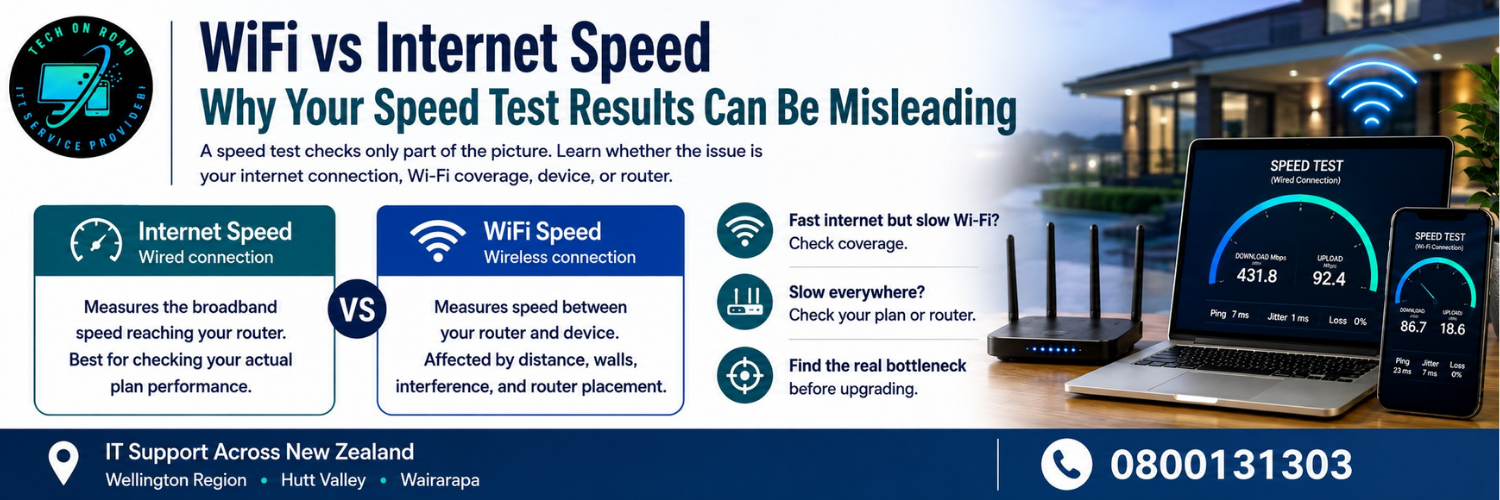
When people compare WiFi speed vs internet speed, they often treat the two as interchangeable. Understanding WiFi vs internet speed helps avoid misdiagnosis. Internet access is the service reaching your property, while Wi-Fi is one method used to connect devices to your router. A test performed over Wi-Fi therefore includes variables that do not exist when the same test is performed through a cable.
The difference between WiFi and the internet becomes clearer in a house with fast fibre. A computer beside the router may record excellent results while a laptop upstairs reports much less. The fibre service has not necessarily changed; the wireless path has.
A single result is evidence, not a verdict. Test conditions, device capability, server selection and local traffic all influence what the number means.
Why the same internet connection can produce different speed results
WiFi vs internet speed can look very different from one room to another, even when every device uses the same broadband plan. The result depends on the conditions between the router, device and test server.
Your test location changes the result
WiFi performance can change as distance increases and as signals pass through walls, floors, cabinetry and other materials. A router positioned at one end of a home may provide excellent service nearby but weaker results in a bedroom or office.
If you are investigating wireless speed problems, repeat the test from the same location each time so you are comparing like with like.
Your device can become the bottleneck
A modern fibre plan does not guarantee that every phone, laptop or television can use its full capacity. Older Wi-Fi hardware, limited network adapters, outdated drivers and slow devices can affect results.
If another device in the same room records a much better result, replacing the broadband plan may not address the actual problem.
Router limitations affect what reaches your devices
Router speed matters because the router sits between your internet service and local devices. Its wireless standard, processing capability, configuration and ability to handle multiple connections can influence the result.
When several devices are active, cloud backups, game downloads, cameras and high-resolution streaming can compete for available capacity. A test taken during a quiet period can therefore look much better than one taken when the household is busy.
How to get broadband speed test results you can trust
A useful test is repeatable. Rather than reacting to one large number, create a comparison that shows where performance changes.
For a broader benchmark, the New Zealand Commerce Commission’s Measuring Broadband New Zealand programme independently monitors broadband performance across New Zealand.
Start with an Ethernet connection and use that baseline to judge home network speed. Pause downloads, cloud synchronisation and streaming, and note any wireless interference. Run several tests using the same device and a nearby test server. Record the results at different times, including a busy evening period if that is when the problem normally occurs.
Then repeat the process over Wi-Fi from the same position.
The comparison can reveal useful patterns:
- Wired and Wi-Fi results are both strong: The broadband service and local connection are likely performing reasonably.
- Wired results are strong, but Wi-Fi results are much lower: Investigate the wireless network, placement or device.
- Both wired and Wi-Fi results are consistently low: Examine the modem or router, service configuration and provider connection.
- One device is consistently slower: Investigate that device before changing the wider setup.
What your speed test may not reveal
When judging WiFi vs internet speed, an internet speed test is valuable, but download and upload figures alone do not describe every aspect of an online experience. Delay, stability, and traffic conditions can also influence how the connection feels.
Latency can matter more than raw speed
A fast connection with high latency can feel poor during activities that require quick responses. Video calls, interactive applications and online gaming are sensitive to delay and fluctuations in that delay.
A household may have hundreds of megabits per second available, yet a busy upload can make a video meeting unstable. The headline download number has not necessarily changed; responsiveness has.
Stability is different from peak speed
An internet speed test captures performance during a short window and may not show intermittent dropouts. If a connection becomes unreliable, repeat testing over time; consistency can matter more than the highest result.
Traffic inside the home changes conditions
A test taken when nobody else is online answers a different question from one taken while people are streaming, backing up photos and downloading files. That difference can materially affect network performance.
A practical way to diagnose Wi-Fi before upgrading broadband
If you are dealing with wireless speed problems, first compare WiFi vs internet speed across devices, locations and connection types. This is easiest to interpret when the variables are changed one at a time.
Try this sequence:
- Test one computer beside the router.
- Test the same computer where the problem occurs.
- Compare Wi-Fi with a wired test where practical.
- Test another device from the same location.
- Repeat when the slowdown is most noticeable.
- Check for heavy downloads or uploads.
This exposes the bottleneck. If wired performance remains strong but Wi-Fi deteriorates upstairs, coverage matters more than a faster package. A WiFi technician can confirm this by comparing signal conditions across rooms. If every wired device performs poorly, investigate the router, modem or incoming service.
When these comparisons are difficult to interpret, Tech On Road works as Internet & Wi-Fi Experts across all regions of New Zealand (Wellington Region, Hutt Valley, Wairarapa), helping assess router placement, mesh networks, wired connections and on-site Wi-Fi issues through its Internet & Wi-Fi Setup services. Its published services also cover Wi-Fi troubleshooting, modem upgrades, mesh installation and LAN networking.
When a faster broadband plan actually makes sense
Not every slow result is caused by Wi-Fi. If a properly conducted wired test repeatedly shows that your connection is substantially below the performance expected from your plan, further investigation is reasonable.
A faster plan can make sense when the household genuinely needs more capacity. Several people working remotely, large uploads, cloud services and high-resolution streaming can increase bandwidth demand.
The key is distinguishing capacity from distribution. Strong wired speeds do not fix a weak wireless signal.
Internet optimisation should begin with diagnosis. Changing the plan first can be an expensive way to solve a problem caused by placement, equipment or device limitations.
Use the result to find the bottleneck, not just the biggest number
The most useful question after performing an internet speed test is not simply “Is this number fast?” It is “Where does performance change?”
If the result changes significantly between a wired connection and Wi-Fi, or between rooms, the local network deserves attention. If all devices show poor wired results, the broadband service or equipment becomes more relevant. If only one machine struggles, investigate the device.
WiFi vs internet speed is ultimately a question of where the connection slows down. A carefully controlled comparison gives you a much clearer picture than a single test taken wherever you happen to be sitting.
Before upgrading anything, compare WiFi speed vs internet speed under consistent conditions, then consider what was happening on the network. A reliable diagnosis can prevent unnecessary upgrades and point you towards the change that will actually improve everyday performance.