PC Requirements For Windows 11 Upgrade: It Is Not Optional Anymore
The Windows 11 upgrade has officially moved from being a choice to becoming a necessity for many users. Whether it’s the push from Microsoft, the increasing lack of support for Windows 10, or the advanced cybersecurity features only available in Windows 11, one thing is clear: it’s time to take this upgrade seriously.
But upgrading isn’t just about installing a new operating system. It often involves a professional PC upgrade as well. From CPU and RAM enhancements to SSD upgrades and enabling TPM 2.0, preparing your hardware is just as essential as installing Windows 11 itself. Especially for users and businesses in Masterton, Carterton, Greytown, and across the greater Wellington and Hutt Valley regions, making sure your PC is both compatible and optimized is a matter of performance, security, and long-term viability.
This blog will help you understand what your computer needs to run Windows 11 smoothly, why both the software and hardware upgrades matter, and how a professional PC upgrade can safeguard your digital life and business operations in today’s threat landscape.
Why Upgrading to Windows 11 Is No Longer Optional
The clock is ticking on Windows 10. With Microsoft confirming the end of support for Windows 10 in October 2025, continuing with outdated systems is becoming risky and inefficient. Windows 11 isn’t just a cosmetic change – it’s built to handle modern workloads, threats, and computing environments.
1. Security First: Built-in Protection
One of the strongest motivations behind upgrading is cybersecurity. Windows 11 introduces advanced security features like hardware-based isolation, encryption, and malware prevention that Windows 10 lacks. Cyber attacks are growing in both volume and sophistication. Without the new architecture of Windows 11, older systems become easier targets for hackers.
However, to take advantage of these features, your hardware must be compatible and up to date. This makes a PC hardware upgrade just as important as the operating system itself.
2. Optimized for Productivity
Windows 11 is engineered to enhance performance, multitasking, and overall system responsiveness. It supports modern apps, faster boot times, and an improved user interface that streamlines how users interact with their systems. But these improvements require hardware that can keep up, especially SSD storage, newer CPUs, and more RAM.
3. Compatibility and Software Support
Many new software platforms and professional tools are now being optimized exclusively for Windows 11. As time goes on, compatibility with newer applications may dwindle for Windows 10, especially in industries requiring advanced IT support and tools. If your PC doesn’t meet the baseline specifications, a hardware upgrade becomes essential before moving to Windows 11.
PC Requirements for Windows 11 Upgrade: Know Your Computer Needs
To ensure your PC is compatible with Windows 11, your system needs to meet specific hardware requirements. These are not just arbitrary changes – they are implemented to improve performance and security.
1. CPU Requirements
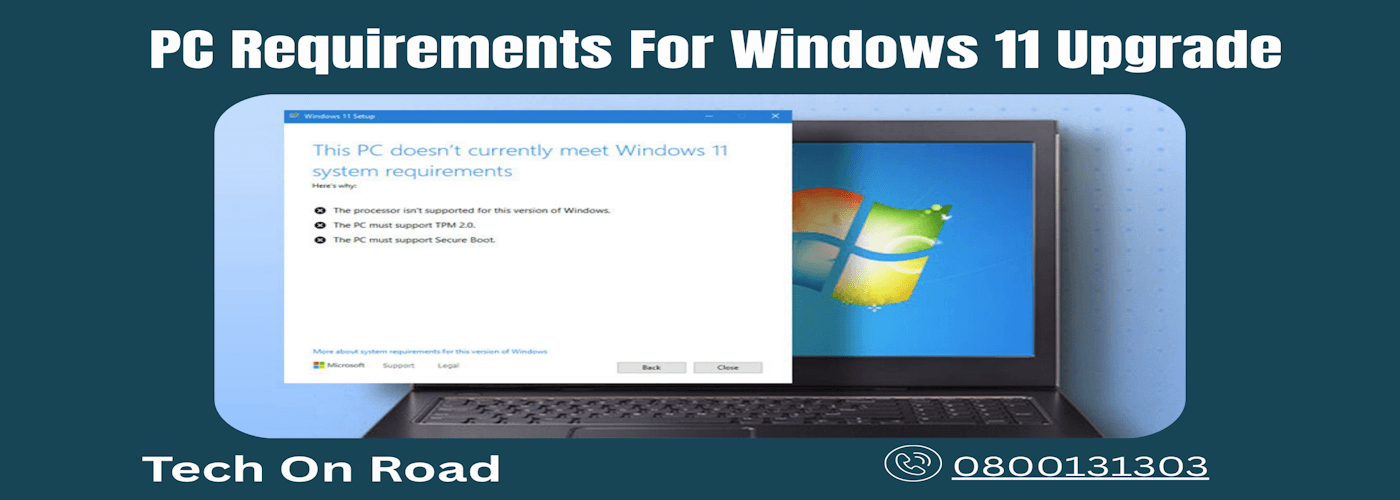
Windows 11 requires a 64-bit processor with at least 1 GHz speed and 2 or more cores. Supported processors include:
- Intel 8th Gen and newer
- AMD Ryzen 2000 series and newer
If your current CPU predates these versions, a professional PC upgrade might be necessary to ensure compatibility. Replacing the CPU or upgrading the motherboard can bring your system up to speed.
2. TPM 2.0: Trusted Platform Module
This is perhaps the most talked-about requirement. TPM 2.0 is a security chip that provides hardware-level protection for sensitive data. It helps safeguard against rootkits, ransomware, and firmware attacks.
Older machines that lack TPM 2.0 will not be eligible for the Windows 11 upgrade. In some cases, it may be available in BIOS but disabled – a technical checkup can clarify this. If it’s not supported, a hardware upgrade or motherboard replacement may be required.
3. Secure Boot Support
Secure Boot ensures that your PC only boots using software trusted by the PC manufacturer. This feature helps prevent malicious software from loading during the startup process. Secure Boot must be enabled in the UEFI firmware settings.
Many users in Carterton and Greytown might not be familiar with Secure Boot or UEFI, but a professional PC service can help configure or upgrade your system for compliance.
4. RAM and Storage
Windows 11 requires a minimum of:
- 4 GB of RAM
- 64 GB of storage
However, for optimal performance, especially for professional or business use, 8 GB of RAM and an SSD (Solid-State Drive) are highly recommended. Upgrading RAM and switching from an HDD to an SSD can dramatically improve speed and performance.
5. Display and Graphics
You’ll need a DirectX 12 compatible graphics card and a display with at least 720p resolution. Most modern systems meet this, but it’s worth verifying to avoid installation issues. If your PC lacks this, a graphics card upgrade may be necessary.
How a Professional PC Upgrade Helps
Upgrading isn’t just about throwing in new hardware. It requires proper evaluation, compatible components, and secure installation. This is where professional PC upgrade services make a difference.
1. Assessment and Consultation
In Masterton and across the Wellington region, professional PC upgrade consultations can identify whether your system meets Windows 11 requirements or needs enhancements. You get a full compatibility check, including TPM and Secure Boot validation.
2. Hardware Upgrades Made Easy
Whether it’s installing a new SSD, upgrading RAM, replacing your motherboard, or ensuring your CPU meets requirements, a technician ensures every component integrates correctly and performs efficiently. Mistakes during DIY upgrades can result in data loss or hardware damage. Upgrading with expert help ensures stability and security.
3. System Backup and Safe Migration
Before upgrading to Windows 11, it’s crucial to back up all your data and settings. Professionals can help you migrate files securely and restore them post-upgrade so nothing gets lost in the process. They can also ensure your hardware upgrades don’t impact your data integrity.
Cybersecurity Comes Built-In With Windows 11
Cybersecurity is not just a concern for big businesses. Even personal users and small offices in Greytown or Hutt Valley are frequent targets for ransomware, phishing, and malware.
1. Hardware-Based Security Features
With Windows 11, security starts from the chip level. TPM 2.0, Secure Boot, and virtualization-based security (VBS) create layers of defense that weren’t available in previous Windows versions. But without compatible hardware, these features won’t function as intended.
2. Windows Hello and Biometric Authentication
Biometric sign-in and facial recognition offer faster, more secure access to your system. If your device supports it, Windows Hello makes it harder for unauthorized users to gain access. Hardware upgrades may be needed to support these features.
3. Enhanced Defender Antivirus
Windows Defender in Windows 11 offers real-time protection, ransomware protection, and firewall management without the need for third-party antivirus software. For many home users in Carterton or Masterton, this provides strong first-layer protection without added costs.
However, for those seeking advanced protection, especially businesses or users handling sensitive data, adding a dedicated cybersecurity solution like Trend Micro can offer deeper security. It brings features like AI-powered threat detection, privacy protection, and secure online transactions, providing an essential layer beyond what built-in tools can offer.
Windows Upgrade Benefits for Businesses in the Wellington Region
For small to medium-sized businesses operating in Wellington, Masterton, or Hutt Valley, the move to Windows 11 is more than an upgrade – it’s a strategic decision. But pairing it with a relevant PC hardware upgrade makes it truly impactful.
1. Streamlined Device Management
Windows 11 integrates better with Microsoft Endpoint Manager, Azure Active Directory, and other business IT platforms. This makes it easier for IT teams to manage devices, enforce security policies, and control software access.
2. Reduced Downtime and Maintenance
Newer hardware and operating systems translate to fewer breakdowns and faster troubleshooting. Windows 11’s error reporting and update system is more refined, keeping systems up to date without unexpected interruptions. Investing in updated components reduces long-term maintenance issues.
3. Better Collaboration Tools
Microsoft Teams is built into Windows 11. Combined with improved virtual desktops and Snap layouts, it offers better tools for multitasking and communication. Businesses can enhance remote work capabilities without additional software, especially when the hardware supports smooth multitasking.
What To Do If Your System Is Not Compatible for Win11
If your PC doesn’t meet the requirements, don’t worry. You have a few options:
1. Upgrade Existing Components
In many cases, upgrading your RAM, storage, or even the CPU can make your system Windows 11-ready. This is often more cost-effective than buying a new PC and extends the life of your current system.
2. Replace or Rebuild
If your system is over 5 to 7 years old, a complete rebuild or replacement might be more practical. Professional PC upgrade services in Masterton and surrounding areas can help build a system that’s future-proof and secure.
3. Seek Expert Advice
Trying to navigate all the technical requirements on your own can be overwhelming. Consult with a local technician who understands not only the technical needs but also your usage patterns and budget. Their guidance ensures you get the right hardware upgrade along with a successful Windows 11 installation.
Windows 11 Installation: Leave It to the Pros
Installing a new operating system can sometimes lead to unexpected issues. Whether it’s driver conflicts, BIOS settings, or data migration problems, things can get tricky.
Letting a professional handle the installation ensures:
- Secure data backup
- Proper BIOS/UEFI configuration
- Clean installation for better performance
- Validation of updates and drivers
- Hardware optimization and testing
Upgrade Smart, Stay Secure with Professional Help
Upgrading to Windows 11 is not just a tech trend—it’s a necessary move toward better security, performance, and long-term reliability. Whether you’re a personal user in Greytown or running a business in Masterton, Carterton, or Wellington, making sure your system meets Windows 11 requirements is more important than ever.
But it’s not only about installing the new operating system. Most computers will need hardware enhancements to truly take advantage of what Windows 11 offers. From enabling TPM 2.0 to installing SSDs, upgrading CPUs, or expanding RAM, every component plays a part in ensuring compatibility and speed.
This is where Tech On Road comes in. We offer professional Windows 11 upgrade and PC upgrade services right at your doorstep. You don’t need to carry your device to a store or wait in line. Our experts come to your home or office anywhere in Masterton, Carterton, Greytown, Wellington, or Hutt Valley, assess your PC, recommend the necessary upgrades, and perform everything onsite.
Don’t wait until Windows 10 becomes obsolete. Let Tech On Road make your transition smooth, secure, and stress-free. Book your upgrade consultation today and future-proof your digital experience with trusted professionals who understand your local needs.