iPhone 18 Pro Battery Draining Fast? Causes and Fixes
A smartphone that needs frequent charging can disrupt everything from business calls and navigation to everyday communication. If you notice your iPhone 18 Pro battery draining fast despite relatively moderate usage, the underlying cause may be related to software processes, device settings, network conditions or battery deterioration.
Before considering mobile phone repair services in NZ, it is worth examining how your device consumes energy and whether the problem is temporary or persistent. This guide explains how to identify unusual battery behaviour, make appropriate adjustments and determine when professional assessment may be necessary.
Why Is Your iPhone 18 Pro Using More Battery Than Expected?
Understanding the reasons behind iPhone 18 Pro battery drain starts with distinguishing normal energy consumption from unusual activity. Demanding applications, prolonged screen usage and system processes can significantly influence how long a charge lasts, even when the battery itself remains in good condition.
Background Processes and Application Behaviour
Applications do not necessarily stop consuming energy when you leave them. Cloud synchronisation, email fetching, photo uploads and navigation can continue while your screen is locked.
Excessive background app activity becomes particularly noticeable when an application consumes a substantial share of battery power despite limited direct usage. Reviewing its activity can reveal whether its energy consumption is justified.
Display Features and Brightness
The Always-On display, extended screen-on time and high brightness levels can increase daily energy requirements.
If you find your iPhone 18 Pro battery draining fast during outdoor use, automatic brightness adjustments under direct sunlight may partly explain the difference. Comparing indoor and outdoor usage can help isolate display-related consumption.
Mobile Network Strength and Connectivity
Maintaining connectivity requires more energy when mobile reception is unreliable. This is particularly relevant when travelling through rural areas, working inside buildings with poor reception or commuting between locations.
A phone repeatedly searching for a stronger signal may consume considerable power even when you are not actively using it.
Battery Condition and Chemical Ageing
Rechargeable lithium-ion batteries gradually lose their ability to store energy. Charging cycles, operating temperatures and usage patterns influence this process.
However, iPhone 18 Pro battery issues should not automatically be attributed to battery deterioration, particularly when the device is relatively new.
How to Identify What Is Draining Your iPhone Battery
Rather than changing multiple settings simultaneously, begin by examining your device’s recorded energy usage. Apple’s built-in battery monitoring tools help distinguish application-related consumption from system activity and connectivity problems.
Examine Your Daily Battery Usage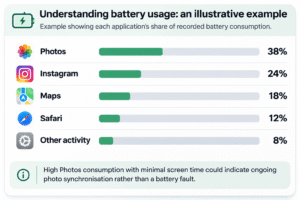
If you notice your iPhone 18 Pro battery draining fast, start with the following checks:
- Open Settings → Battery.
- Review the Daily Usage chart and compare consumption with previous days.
- Select View All Battery Usage for detailed information.
- Examine individual applications and system activities.
- Compare foreground usage with activity occurring while applications are not visible.
Pay attention to whether increased consumption corresponds with changes in your routine.
Compare Active Usage with Standby Consumption
Losing charge during video recording or gaming is considerably different from losing charge overnight without significant interaction.
If the battery level falls noticeably while the phone remains unused, investigate synchronisation, notifications, network coverage and background processes. Standby consumption can provide useful diagnostic clues that screen-on usage alone cannot explain.
Is Battery Drain Normal After an iOS Update?
Finding your iPhone 18 Pro battery draining fast immediately after installing an update does not necessarily indicate a software defect or damaged battery.
Following an update, background system tasks can continue even after the device becomes available for normal use. Apple acknowledges that these processes may temporarily affect battery performance and device temperature.
This type of post-update battery drain should generally improve once the remaining tasks are completed.
Temporary activity versus persistent problems:
| Temporary activity | Persistent problems |
| Begins after updating iOS | Occurs without an identifiable trigger |
| Background update activity is visible | No clear activity explains consumption |
| Gradually improves | Continues over several days |
| Temporary increase in warmth | Repeated unusual heating during light use |
According to Apple’s battery troubleshooting guidance, allowing a few days after an iOS update can help determine whether increased battery consumption is temporary. Check the Battery section for information about ongoing update or device setup activity.
If excessive power consumption continues after these processes finish, further troubleshooting is appropriate.
Which iPhone Settings Can Improve Battery Performance?
Effective iOS battery optimisation involves identifying unnecessary energy consumption without compromising essential smartphone functionality. Instead of disabling every feature, make targeted adjustments based on the battery usage information you have collected.
Adjust Display and Auto-Lock Preferences
Review your screen brightness settings and enable automatic brightness adjustment where appropriate.
Under Settings → Display & Brightness, consider shortening the Auto-Lock interval and disabling the Always-On display if you rarely benefit from it.
Manage Background App Refresh
Navigate to Settings → General → Background App Refresh.
Restrict applications that do not require regular background updates. This can be particularly useful for shopping, entertainment or social media applications that you use infrequently.
Applications may still perform permitted background tasks independently of this setting.
Review Location Permissions
Investigate location services battery usage under Settings → Privacy & Security → Location Services.
Where suitable, change application permissions to allow location access only during use. Retain necessary permissions for navigation, safety and other location-dependent functions.
Optimise Mobile Connectivity
If you experience your iPhone 18 Pro battery draining fast while travelling, compare battery performance in areas with reliable Wi-Fi and those with weak mobile reception.
Using 5G Auto, where available, can help balance connectivity performance with energy efficiency.
Use Adaptive Power and Low Power Mode
Adaptive Power can make automatic adjustments when energy demand increases, while Low Power Mode reduces selected background functions and other power requirements.
These features are useful for extending available charge but should not replace investigation into persistent abnormal battery consumption.
What Does Battery Health Reveal About Your Device?
If you still notice your iPhone 18 Pro battery draining fast after addressing software and usage-related factors, examining its physical battery condition becomes increasingly important.
Navigate to Settings → Battery → Battery Health.
The battery health settings provide information that can help assess:
- Maximum capacity: The estimated remaining capacity compared with when the battery was new.
- Cycle count: The accumulated equivalent of complete battery charging cycles.
- Service recommendations: Whether the device has identified a battery condition requiring attention.
As explained in Apple’s guide to iPhone battery health and performance, chemical aging gradually reduces the amount of energy a battery can store, resulting in shorter operating times between charges. However, abnormal battery consumption despite a relatively high maximum capacity may indicate software activity or another hardware-related issue.
When Do Battery Drain and Overheating Indicate a More Serious Problem?
The combination of iPhone 18 Pro overheating and battery drain requires greater attention when it occurs repeatedly during ordinary activities rather than demanding tasks.
Warning signs include:
- Significant battery loss while the device remains idle.
- Unexpected shutdowns despite remaining charge.
- Persistent heating during basic activities.
- Charging interruptions or inconsistent battery percentage readings.
- Visible battery swelling or separation of the display.
If you suspect battery swelling or physical damage, stop using and charging the device and arrange professional assistance.
Persistent iPhone 18 Pro battery life problems require individual assessment rather than assumptions about a widespread manufacturing defect.
Is Battery Replacement Necessary or Would Troubleshooting Be Sufficient?
When investigating your iPhone 18 Pro battery draining fast, professional iPhone battery diagnostics can help determine whether replacing the battery is justified or whether the underlying problem requires a different solution.
At Tech On Road, we offer professional mobile phone repair in NZ, across Wellington, Hutt Valley, Wairarapa and surrounding suburbs. For unexplained battery loss, assessing software behaviour, charging performance and battery condition before recommending replacement helps establish a more appropriate repair pathway. Service availability depends on the device and fault.
The same diagnostic principles apply if your search for “iPhone 18 Pro Pro Max battery draining fast” concerns the larger Pro Max model.
Before approving replacement, consider applicable warranty coverage, replacement part quality and assessment findings.
Make an Informed Decision About Your iPhone’s Battery Performance
The experience of your iPhone 18 Pro battery draining fast can arise from several interconnected factors, and replacing the battery is not always the appropriate first response.
Begin by understanding your consumption patterns, reviewing recent software changes and checking battery condition. Make individual adjustments and observe whether performance improves under comparable usage conditions.
If unexplained power loss continues, seek a qualified assessment rather than relying on temporary charging solutions. Identifying the underlying cause is the most effective starting point for restoring dependable everyday battery performance.